New Feature: Blu-ray Deals Tool (Update)
HomeNew Feature: Blu-ray Deals Tool (Update)
Posted November 19, 2010 08:10 AM by Webmaster
With Black Friday coming up, there will soon be thousands of items heavily
discounted and it might be hard to find the very best deals and items that interest you
specifically. This is why the Blu-ray.com team has added a new powerful deals tool to help you easily find the very best deals online on stuff that you are interested in.
Update:
1) You can now also filter by movie popularity, the options are: "All releases", "Above average", "Popular releases", "Blockbusters".
2) If you are using the "Lowest Prices" tab and you are logged in as a member and have your preferences set to show movies from different countries, current currency rates will be taken into account when ordering the titles (updated hourly).
3) If you are logged in as a member you can now use a new checkbox to only show movies that are in your collection wishlist.
4) A "TV on Blu-ray" option to "Show category" has been added, so you can choose to only display TV releases.
Blu-ray Deals Tool
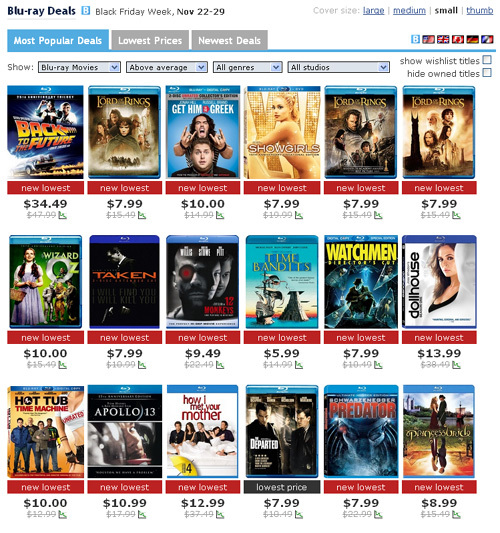
Screenshot of the Deals Tool
The Deals Tool is arranged into three different tabs:
Most Popular Deals
This tab lists all the most popular deals in popularity order and is the default tab.
Lowest Prices
This tab lists all the most popular deals in price order. If you logged in as a member and have your settings set to display movies from different countries, current currency rates will be taken into account (updated hourly).
Newest Deals
This tab lists all the most popular deals in chronological order. Since Black Friday seems to have extended into "Black Friday Week" this year, this tab will be useful to see what new items have just been discounted. All deals and prices are tracked close to real-time.
After selecting a tab, you can use several filters to find what you are looking for:
Show category
You can switch between seeing deals for all Blu-ray movies, Blu-ray box sets only, Blu-ray on TV only and PS3 games. Box set support has also been improved on the site in general: you can now search specifically for box sets and you will now see how much you save by buying the box set instead of the individual titles (if applicable). Example 1: when buying Best of Blu-ray: Action you currently save $30.97. Example 2: Instead of buying only The Condemned for $13.99, you can actually buy both War / Condemned for $10.99(!), saving $12.49.
Filter by movie popularity
You can optionally filter by movie popularity, the options are: "All releases", "Above average" (default), "Popular relases", "Blockbusters". (Blu-ray movies only).
Show studios
You can optionally filter by studio (Blu-ray movies only).
Show genre
You can optionally filter by genre (Blu-ray movies only).
Show wishlist titles
You can optionally choose to only show movies/games that are in your collection wishlist. This feature requires that you are logged in and have added movies/games to your collection wishlist.
Hide owned titles
You can optionally choose to filter out your already owned movies/games. This feature requires that you are logged in and have added movies/games to your collection.
Layout
You can select the layout/cover size and how many movies/games you want to display on each row. The options are "large", "medium", "small", "thumb". If you are using a PC with a high resolution you likely want to use "thumb" to get a better overview of all deals, but for example if you are in a store and is using your mobile you might want to use "large" or something in between.
Countries
Finally you can switch between seeing deals for US, UK, Canada, Germany and France, by clicking the flags at the top-right of the site. Remember that when clicking a flag the whole site will be reflected with the selection. Logged in members can also select to display any combination of countries simultaneously, by clicking the "B" to the left of the flags and specifying the countries and options in the site preferences.
As always it's 100% free to become a member.
Update:
1) You can now also filter by movie popularity, the options are: "All releases", "Above average", "Popular releases", "Blockbusters".
2) If you are using the "Lowest Prices" tab and you are logged in as a member and have your preferences set to show movies from different countries, current currency rates will be taken into account when ordering the titles (updated hourly).
3) If you are logged in as a member you can now use a new checkbox to only show movies that are in your collection wishlist.
4) A "TV on Blu-ray" option to "Show category" has been added, so you can choose to only display TV releases.
Blu-ray Deals Tool
Screenshot of the Deals Tool
How it works
The Deals Tool is arranged into three different tabs:
Most Popular Deals
This tab lists all the most popular deals in popularity order and is the default tab.
Lowest Prices
This tab lists all the most popular deals in price order. If you logged in as a member and have your settings set to display movies from different countries, current currency rates will be taken into account (updated hourly).
Newest Deals
This tab lists all the most popular deals in chronological order. Since Black Friday seems to have extended into "Black Friday Week" this year, this tab will be useful to see what new items have just been discounted. All deals and prices are tracked close to real-time.
After selecting a tab, you can use several filters to find what you are looking for:
Show category
You can switch between seeing deals for all Blu-ray movies, Blu-ray box sets only, Blu-ray on TV only and PS3 games. Box set support has also been improved on the site in general: you can now search specifically for box sets and you will now see how much you save by buying the box set instead of the individual titles (if applicable). Example 1: when buying Best of Blu-ray: Action you currently save $30.97. Example 2: Instead of buying only The Condemned for $13.99, you can actually buy both War / Condemned for $10.99(!), saving $12.49.
Filter by movie popularity
You can optionally filter by movie popularity, the options are: "All releases", "Above average" (default), "Popular relases", "Blockbusters". (Blu-ray movies only).
Show studios
You can optionally filter by studio (Blu-ray movies only).
Show genre
You can optionally filter by genre (Blu-ray movies only).
Show wishlist titles
You can optionally choose to only show movies/games that are in your collection wishlist. This feature requires that you are logged in and have added movies/games to your collection wishlist.
Hide owned titles
You can optionally choose to filter out your already owned movies/games. This feature requires that you are logged in and have added movies/games to your collection.
Layout
You can select the layout/cover size and how many movies/games you want to display on each row. The options are "large", "medium", "small", "thumb". If you are using a PC with a high resolution you likely want to use "thumb" to get a better overview of all deals, but for example if you are in a store and is using your mobile you might want to use "large" or something in between.
Countries
Finally you can switch between seeing deals for US, UK, Canada, Germany and France, by clicking the flags at the top-right of the site. Remember that when clicking a flag the whole site will be reflected with the selection. Logged in members can also select to display any combination of countries simultaneously, by clicking the "B" to the left of the flags and specifying the countries and options in the site preferences.
As always it's 100% free to become a member.