Preparing for Black Friday 2017: Deals Tool and Price Tracking
HomePreparing for Black Friday 2017: Deals Tool and Price Tracking
Posted November 17, 2017 10:00 AM by Webmaster
The last few years Black Friday has been extended to a longer deals period called
"Black Friday Week", which starts on Monday November 20th, peaks on Black Friday 24th
and ends with Cyber Monday 27th. This means that you should typically see a lot of
great price drops the first day of Black Friday Week, Monday 20th, then more price drops
during the week and then more great price drops on Black Friday and then some
additional price drops on Cyber Monday.
To get the most out of this year's Black Friday Week, we recommend:
1) Set price tracking on Blu-ray movies and games that you know you really want, you will then be automatically notified when the price drops and meets your target price (this feature requires a registered account, 100% free). Click on the magnifying glass icon below the title's cover to set your target price. You can also get an instant mobile notification with our iPhone- or Android app (the apps are 100% free). The apps are synchronized with your account at Blu-ray.com, so you only need to install the app and login with your regular username and password.
2) There will be tons of deals on movies that you had forgotten that you want, or simply can't resist at the low price, this is where the Deals Tool comes in handy to help you find and filter out the very best deals that you are interested in.
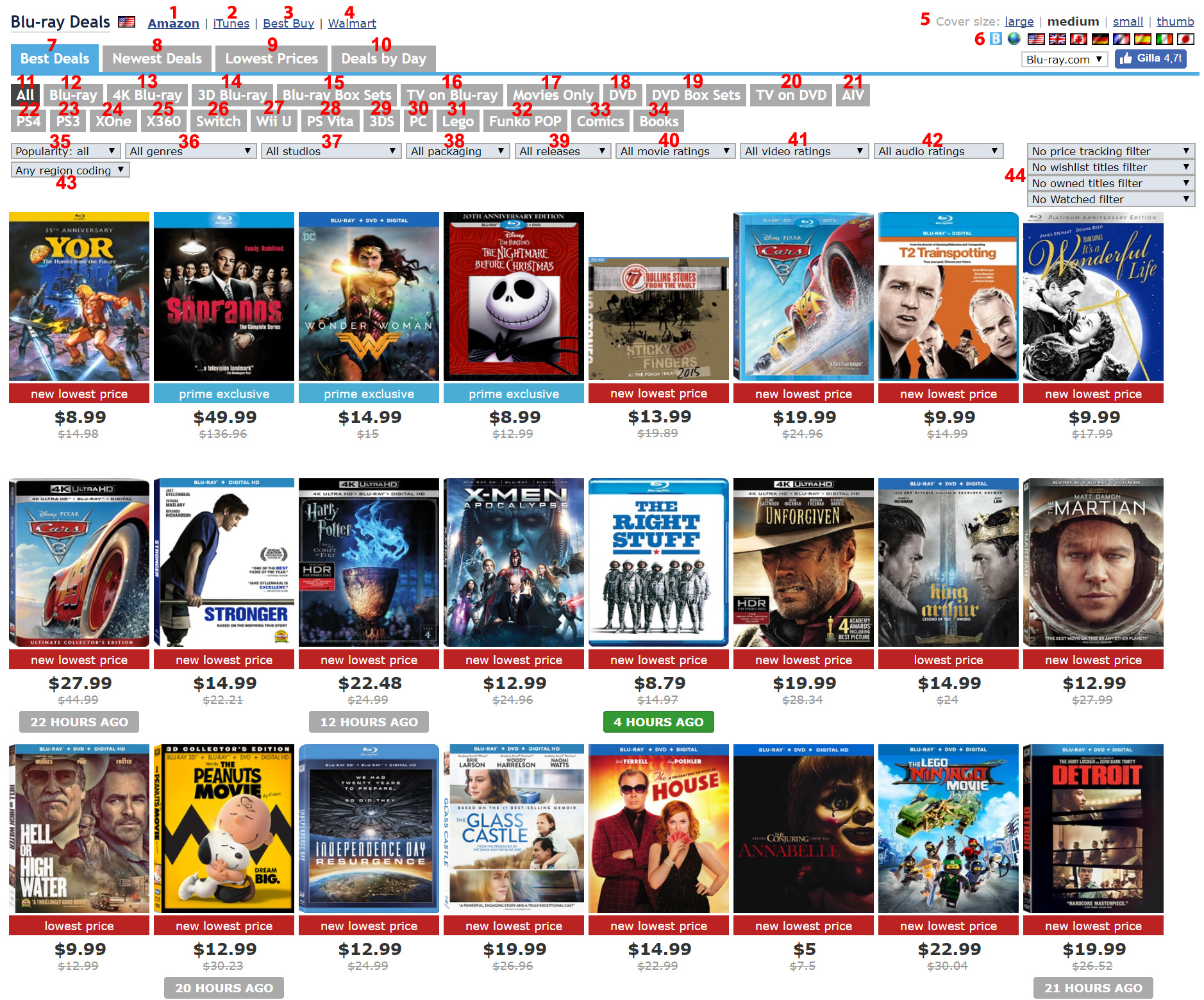
Screenshot of the Deals Tool
You can switch between retailers to see the best deals from each one of them:
1. Amazon
2. iTunes
3. Best Buy
4. Walmart
5. Cover size
There are four options for the cover size: "large", "medium", "small" and "thumb". Select the one you prefer.
6. Country
Click on the country flag you want to display deals for, options are: United States, United Kingdom, Canada, Germany, France, Spain, Italy and Japan. There's also a globe icon which will display deals from all countries and if you are a logged in member, there's a "B" icon which will display your own combination of customly selected countries and region free titles.
7. Best Deals
This tab lists all the best deals in popularity order and is the default tab.
8. Newest Deals
This tab lists all the most popular deals in chronological order. Since Black Friday has extended into "Black Friday Week", this tab will be useful to see what new items have just been discounted. All deals and prices are tracked close to real-time.
9. Lowest Prices
This tab lists all the most popular deals in price order. If you logged in as a member and have your settings set to display movies from different countries, current currency rates will be taken into account (updated hourly).
10. Deals by Day
An alternative to the Newest Deals tab, useful if you don't visit the site every day as it display an overview of which day the deals showed up/price dropped.
11. All
The default tab, will display all Blu-ray deals.
12. Blu-ray
Will display only regular Blu-ray movies, not 4K.
13. 4K Blu-ray
Will only display deals for 4K Blu-ray movies.
14. 3D Blu-ray
Will only display deals for 3D Blu-ray movies.
15. Blu-ray Box Sets
Will only display deals for Blu-ray box sets.
16. TV on Blu-ray
Will only display TV shows/series on Blu-ray.
17. Movies Only
The inverse of 16, will only display movies and not TV shows/series.
18. DVD
Will display all DVD deals.
19. DVD Box Sets
Will only display deals for DVD box sets.
20. TV on DVD
Will display TV shows/series on DVD, can be useful since some TV series are still not available on Blu-ray.
21. AIV
Amazon Instant Video deals.
22. PS4
Displays PlayStation 4 game deals.
23. PS3
Displays PlayStation 3 game deals.
24. XOne
Displays Xbox One game deals.
25. X360
Displays Xbox 360 game deals.
26. Switch NEW
Displays Nintendo Switch game deals.
27. Wii U
Displays Wii U game deals.
28. PS Vita
Displays PS Vita game deals.
29. 3DS
Displays Nintendo 3DS game deals.
30. PC
Displays PC game deals.
31. Lego NEW
Displays movie related Lego deals.
32. Funko POP NEW
Displays movie related Funko POP deals.
33. Comics NEW
Displays movie related Comic Book deals.
34. Books NEW
Displays movie related Book deals.
After selecting the category you are interested in, you can use several filters to find what you are looking for within the category:
35. Popularity
You can optionally filter by movie popularity, the options are: "Above average", "Popular releases" and "Blockbusters".
36. Genre
You can optionally filter by movie genre to narrow down your interests.
37. Studio
You can optionally filter by movie studio (the major ones).
38. Packaging
You can optionally filter by packaging, such as SteelBooks, DigiBooks, IronPacks, MetalPacks etc. This can be useful for collectors who quickly wants to browse different countries for exclusives.
39. Releases
You can optionally filter to display only already released titles or only upcoming titles/pre- orders.
40. Movie rating
You can optionally filter to display movies with a selected movie rating or higher.
41. Video rating
You can optionally filter to display movies with a selected video rating or higher.
42. Audio rating
You can optionally filter to display movies with a selected audio rating or higher.
43. Region free
You can optionally filter for region free titles, this can be useful to find titles outside your region, such as The Tudors and/or taking advantage of for example the currently cheap british pound.
44. Collection filtering
Logged in members can optionally select to only display price tracked titles "show price tracked titles", or titles that are currently in the wishlist "show wishlist titles" or exclude already owned titles ("filter exact editions" or "filter all editions"), or Watched/Wishlist titles. This is especially useful for those with a lot of price trackings or a large collection.
On rare occasions you will see Gold Box Deals in yellow/gold, those are almost always very good deals and on other rare occasions you will see "$x off coupon" with a green background, this means that a coupon is currently offered for this title. Prime exclusive deals are displayed with a blue background, to take advantage of those deals you need to be an Amazon Prime member.
To get the most out of this year's Black Friday Week, we recommend:
1) Set price tracking on Blu-ray movies and games that you know you really want, you will then be automatically notified when the price drops and meets your target price (this feature requires a registered account, 100% free). Click on the magnifying glass icon below the title's cover to set your target price. You can also get an instant mobile notification with our iPhone- or Android app (the apps are 100% free). The apps are synchronized with your account at Blu-ray.com, so you only need to install the app and login with your regular username and password.
2) There will be tons of deals on movies that you had forgotten that you want, or simply can't resist at the low price, this is where the Deals Tool comes in handy to help you find and filter out the very best deals that you are interested in.
Deals Tool
Screenshot of the Deals Tool
Retailers
You can switch between retailers to see the best deals from each one of them:
1. Amazon
2. iTunes
3. Best Buy
4. Walmart
Layout and country settings
5. Cover size
There are four options for the cover size: "large", "medium", "small" and "thumb". Select the one you prefer.
6. Country
Click on the country flag you want to display deals for, options are: United States, United Kingdom, Canada, Germany, France, Spain, Italy and Japan. There's also a globe icon which will display deals from all countries and if you are a logged in member, there's a "B" icon which will display your own combination of customly selected countries and region free titles.
Main tabs
7. Best Deals
This tab lists all the best deals in popularity order and is the default tab.
8. Newest Deals
This tab lists all the most popular deals in chronological order. Since Black Friday has extended into "Black Friday Week", this tab will be useful to see what new items have just been discounted. All deals and prices are tracked close to real-time.
9. Lowest Prices
This tab lists all the most popular deals in price order. If you logged in as a member and have your settings set to display movies from different countries, current currency rates will be taken into account (updated hourly).
10. Deals by Day
An alternative to the Newest Deals tab, useful if you don't visit the site every day as it display an overview of which day the deals showed up/price dropped.
Category tabs
11. All
The default tab, will display all Blu-ray deals.
12. Blu-ray
Will display only regular Blu-ray movies, not 4K.
13. 4K Blu-ray
Will only display deals for 4K Blu-ray movies.
14. 3D Blu-ray
Will only display deals for 3D Blu-ray movies.
15. Blu-ray Box Sets
Will only display deals for Blu-ray box sets.
16. TV on Blu-ray
Will only display TV shows/series on Blu-ray.
17. Movies Only
The inverse of 16, will only display movies and not TV shows/series.
18. DVD
Will display all DVD deals.
19. DVD Box Sets
Will only display deals for DVD box sets.
20. TV on DVD
Will display TV shows/series on DVD, can be useful since some TV series are still not available on Blu-ray.
21. AIV
Amazon Instant Video deals.
22. PS4
Displays PlayStation 4 game deals.
23. PS3
Displays PlayStation 3 game deals.
24. XOne
Displays Xbox One game deals.
25. X360
Displays Xbox 360 game deals.
26. Switch NEW
Displays Nintendo Switch game deals.
27. Wii U
Displays Wii U game deals.
28. PS Vita
Displays PS Vita game deals.
29. 3DS
Displays Nintendo 3DS game deals.
30. PC
Displays PC game deals.
31. Lego NEW
Displays movie related Lego deals.
32. Funko POP NEW
Displays movie related Funko POP deals.
33. Comics NEW
Displays movie related Comic Book deals.
34. Books NEW
Displays movie related Book deals.
Filters
After selecting the category you are interested in, you can use several filters to find what you are looking for within the category:
35. Popularity
You can optionally filter by movie popularity, the options are: "Above average", "Popular releases" and "Blockbusters".
36. Genre
You can optionally filter by movie genre to narrow down your interests.
37. Studio
You can optionally filter by movie studio (the major ones).
38. Packaging
You can optionally filter by packaging, such as SteelBooks, DigiBooks, IronPacks, MetalPacks etc. This can be useful for collectors who quickly wants to browse different countries for exclusives.
39. Releases
You can optionally filter to display only already released titles or only upcoming titles/pre- orders.
40. Movie rating
You can optionally filter to display movies with a selected movie rating or higher.
41. Video rating
You can optionally filter to display movies with a selected video rating or higher.
42. Audio rating
You can optionally filter to display movies with a selected audio rating or higher.
43. Region free
You can optionally filter for region free titles, this can be useful to find titles outside your region, such as The Tudors and/or taking advantage of for example the currently cheap british pound.
44. Collection filtering
Logged in members can optionally select to only display price tracked titles "show price tracked titles", or titles that are currently in the wishlist "show wishlist titles" or exclude already owned titles ("filter exact editions" or "filter all editions"), or Watched/Wishlist titles. This is especially useful for those with a lot of price trackings or a large collection.
Legend
On rare occasions you will see Gold Box Deals in yellow/gold, those are almost always very good deals and on other rare occasions you will see "$x off coupon" with a green background, this means that a coupon is currently offered for this title. Prime exclusive deals are displayed with a blue background, to take advantage of those deals you need to be an Amazon Prime member.